Summary: A bigger NPU does not guarantee faster edge AI. TOPS measures one stage of a longer pipeline. Before redesigning hardware, find out where the milliseconds actually go.
TOPS is not edge AI performance
You upgraded the NPU from 2 TOPS to 10 TOPS, and your edge AI is still slow. How is that possible? Because the NPU is only one part of the pipeline:
Camera → ISP → Pre-processing → NPU → Post-processing → Application
What TOPS actually measures
TOPS (tera operations per second) is a peak figure: how many simple operations the accelerator can perform per second under ideal conditions, usually at a specific numeric precision such as INT8. It says nothing about how well your particular model maps onto the accelerator, how fast data reaches it, or what happens before and after inference.
A model reaches peak throughput only when every layer runs on the NPU, the data is already in the right format and memory, and nothing else competes for bandwidth. Real pipelines rarely look like that.
Where the real bottleneck hides
The time is often lost outside the NPU. The real bottleneck might be:
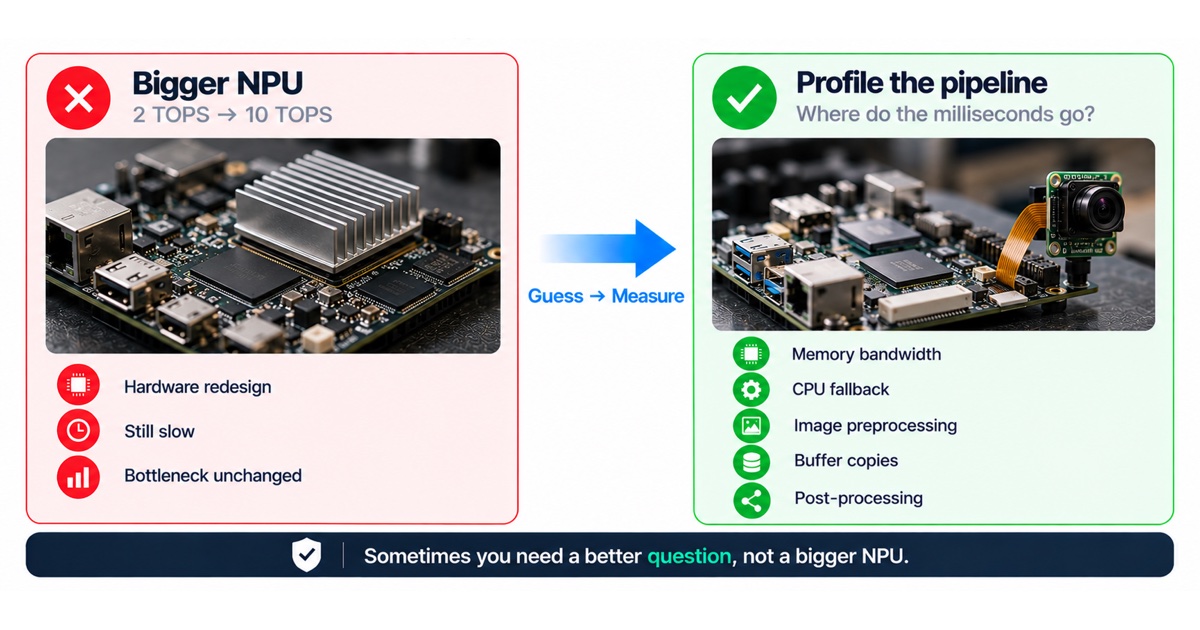
- Memory bandwidth.
- CPU fallback.
- Image preprocessing.
- Buffer copies.
- Post-processing.
Yet the first reaction is often: “We need a bigger NPU.”

How each bottleneck shows up
| Bottleneck | What happens | Typical fix |
|---|---|---|
| Memory bandwidth | The NPU waits for data, especially with large inputs or several models | Smaller input resolution, fewer copies, better memory layout |
| CPU fallback | Layers the NPU does not support run on the CPU | Replace unsupported operators, adjust the model or converter settings |
| Image preprocessing | Resizing, colour conversion and normalisation run on the CPU | Move them to the ISP or a hardware scaler, or into the model |
| Buffer copies | Frames are copied between camera, CPU and NPU buffers | Zero-copy buffer sharing between pipeline stages |
| Post-processing | Decoding detections and filtering results takes longer than inference | Optimise or move the decode step, reduce candidate boxes |
Ask a better question
This is where engineering approaches start to differ. Some teams implement the request. Some challenge the technology. Some ask a more important question: where do the milliseconds actually go?
That question can be the difference between optimising the system and redesigning hardware that was never the problem. Sometimes you need a bigger NPU. Sometimes you need a better question.
How to find out where the milliseconds go
- Measure end-to-end latency from frame capture to application result on the target device.
- Timestamp every stage of the pipeline: capture, ISP, preprocessing, inference, post-processing and application logic.
- Check which model layers run on the NPU and which fall back to the CPU, using the vendor’s profiling tools.
- Watch CPU load, memory bandwidth and temperature while the pipeline runs for a long time, not only for a short benchmark.
- Compare the measured inference time with the vendor benchmark for the same model and precision.

When a bigger NPU is the right answer
Sometimes it is. If profiling shows that inference itself dominates, the model already runs fully on the accelerator, data movement is efficient, and the model cannot be made smaller without losing the accuracy you need, more accelerator capacity is a reasonable decision. The point is to make that decision from measurements, before the hardware is redesigned.
Checklist before changing the SoC
- Do we have an end-to-end latency budget, broken down by stage?
- Does every layer of the model run on the NPU?
- Are frames copied more often than necessary?
- Is preprocessing on the CPU when the hardware could do it?
- Have we tested at sustained load and real temperature?
- What else changes with a new SoC: BSP, drivers, power, thermal design and certification?
A practical latency budget
Start every edge AI project with a latency budget for the whole pipeline, not only for the model. Split the target into stages: capture and ISP, preprocessing, inference, post-processing and the application’s own logic, including any network or display step. Then measure each stage on the target hardware as early as possible, even with a placeholder model.
The budget turns a vague complaint (“it is slow”) into a specific question (“post-processing takes longer than inference”). It also shows where hardware matters and where software is the faster fix.
Hardware choices that matter more than peak TOPS
- Which operators and precisions the accelerator supports, and how mature the vendor’s model conversion tools are.
- Memory bandwidth and how the camera, ISP, CPU and accelerator share it.
- Hardware blocks for scaling and colour conversion that can take preprocessing off the CPU.
- Support for sharing buffers between stages without copies.
- Thermal behaviour at sustained load in the real enclosure.
These factors often decide real-world performance more than the headline TOPS figure, and they are worth checking before a platform is chosen.
FAQ
Why does the vendor benchmark look so much better?
Benchmarks usually measure inference alone, with a model that suits the accelerator. Your pipeline adds camera, preprocessing, copies and post-processing, and your model may include layers that fall back to the CPU.
Does quantisation solve it?
Quantisation often helps inference speed and memory use, but it does not fix copies, CPU fallback or slow post-processing. It also needs an accuracy check on real data.
How long does profiling take?
Usually far less than a hardware redesign. A first breakdown of where the time goes is often enough to decide the next step.
Can the same model run faster on the same hardware?
Often, yes. Converting the model with the vendor’s tools at a supported precision, replacing operators that fall back to the CPU, reducing the input resolution where accuracy allows, and removing copies between stages can each make a large difference without a hardware change. Measure each step separately so you know which change helped.
What about running several models at once?
Several models compete for the same accelerator, memory bandwidth and CPU time. Schedule them deliberately, share preprocessing where the inputs are the same, and measure the combined pipeline under sustained load. Adding a second model often costs more than its benchmark suggests.
How do we keep performance from regressing?
Add a pipeline latency test to the release process, run on the target hardware. A new model, a new driver or an operating system update can each change performance, and a simple automated check catches it before devices in the field slow down.
How we help
We profile and optimise edge AI pipelines on the target device, and review SoC choices before they are locked in. See our edge AI and computer vision and SoC and SoM selection review services. If your model is slower on the device than the benchmark promised, talk to an engineer.