Summary: We moved the LaMetric IoT platform from DigitalOcean to Hetzner, and the fleet could not go offline while we did it. A web app can show a maintenance page; a connected device cannot. The servers were the easy part. What made the move safe was in the devices and the process: finding the cloud by name instead of by address, running brokers on both sides, reconnecting with jitter, checking the data before traffic moves, and watching the same dashboards on both sides. The switch went unnoticed by users, and monthly infrastructure costs dropped by more than 80%.
Why we moved
The reason was economics. Hetzner offered significantly more resources for the same money: more CPU, more RAM and 20 TB of monthly bandwidth. At our scale, that made the case on its own. The monthly infrastructure bill has since dropped by more than 80%.
The cost of the move was not the servers. It was the fleet.
Why a fleet can’t take a maintenance window
Think about what a connected device does all day. It opens an MQTT connection to the cloud and holds it open. It publishes readings, listens for commands and waits for updates. It expects the cloud to be where it was a minute ago, and it expects the same answer to the same request.
When a web app moves between hosts, the worst case is a short maintenance page. Users see it, wait and refresh. A device in someone’s kitchen or on a factory floor does not wait politely. It retries on its own schedule, or it gives up and shows an error to a person who never asked to be part of a migration.
The LaMetric cloud serves about 75,000 devices at 99.9% uptime. A move like this is where that number is won or lost. The notes below are the checklist we would give any team moving a live device backend between providers.
What a live backend move needs
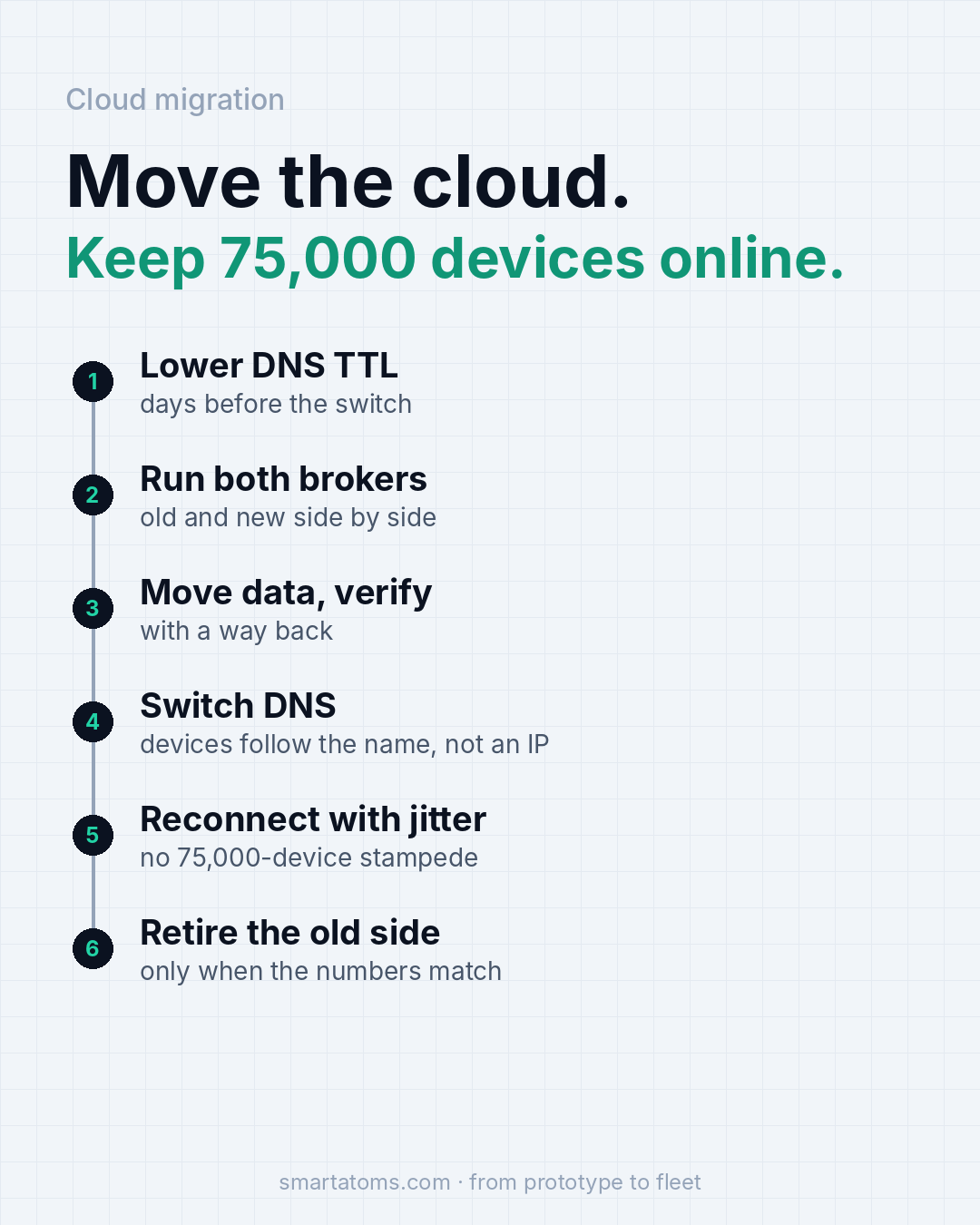
- Devices that find the cloud by DNS name, never by a hard-coded IP. Lower the TTL days before the switch, so the change reaches devices quickly once you make it.
- Brokers on both sides for a while. Devices land on the new one as they reconnect, and the old one keeps serving the rest.
- Reconnect with backoff and jitter in the firmware. Thousands of devices should not hit the new broker in the same second.
- Data moved and checked before traffic moves, with a way back if the numbers don’t match.
- The same dashboards on both sides: connected devices, message rate, error rate.
Each of these looks small. Together they are the difference between a migration nobody notices and an incident.
How the move went
Migrating a fleet of thousands of connected devices took careful planning and several coordinated steps:
- Spin up a mirror of the infrastructure on the new provider.
- Set up database replication and MQTT broker bridging between the two environments.
- Synchronize content with dedicated scripts.
- Purge the Cloudflare caches for the website before the final cut-over.
- Switch.
The surprising part is how uneventful the switch was. Despite all those moving pieces, it went unnoticed by users: no complaints and no visible disruption. That is how an infrastructure migration should feel from the outside.
Name, not address
The first decision was made years before any move: how does a device know where the cloud is? If the answer is an IP address baked into firmware, the move is a firmware release that has to reach every unit before you can switch anything. If the answer is a DNS name, the move is a DNS change.
DNS has its own catch. Resolvers cache answers for as long as the TTL says, and some devices and gateways cache for longer. That is why the TTL goes down days before the switch, not on the day: it minimizes how long clients keep resolving to the old infrastructure. You want the old, long-lived answers to have expired before you depend on the new, short-lived one.
Two brokers at once
A hard cut-over asks every device to move at the same moment. Running a broker on both sides removes that moment. Devices that reconnect after the DNS change get the new address and land on the new broker. Devices that have not reconnected yet stay on the old one and keep working.
The move then happens over hours or days, at the pace of the devices themselves, instead of in one step you cannot take back. The price is that for a while you have two places where a message can arrive. Everything downstream, from storage to the apps that read device data, has to cope with that, so plan it before the switch.
Jitter, so you don’t stampede your own broker
When a broker drops connections, devices reconnect. If they all reconnect on a fixed schedule, they all arrive together. At 75,000 devices that is a self-inflicted load test, and the new broker meets it with cold caches and no history.
Exponential backoff with random jitter in the firmware spreads those reconnects over time. It costs a few lines of code and it protects every outage and every move you will ever have. If your devices do not have it, adding it through an OTA update is the best preparation you can make for a migration. It is also one more reason a reliable update path comes first: you cannot fix reconnect behavior on a fleet you cannot reach.
Verify the data, keep a way back
Moving traffic is the visible part. Moving data is the part that can hurt you quietly. Copy it to the new side before devices follow, check it against the old side, and only then move traffic. Decide in advance what “the numbers don’t match” means and what you do when that happens.
The way back matters more than the way forward. A plan that works only if nothing goes wrong is not a migration plan. With the old side still running and the TTL still low, going back is a DNS change, not a rebuild. Retire the old side only when the numbers on the new one match what you expect.
Same dashboards, both sides
You cannot judge a move you cannot see. Before switching, put the same three views on both sides: how many devices are connected, how many messages per second are flowing, and how many errors devices are reporting. During the move, the connected count should slide from one side to the other while the total stays flat and the error rate stays where it was.
If the total dips, devices are failing to reconnect. If the error rate rises on the new side, something differs from the old one. Because the dashboards are the same, the comparison takes seconds instead of an investigation.

A short checklist for your own move
- Does every device find the cloud by name, and do you know how long each device or gateway caches that name?
- Can you run old and new brokers side by side, and can everything downstream handle messages arriving at either?
- Do devices reconnect with backoff and jitter, or all at once?
- Have you verified the data on the new side before moving traffic, and do you know what the way back is?
- Are connected devices, message rate and error rate visible on both sides on one screen?
If any answer is “not sure”, that is the work to do before the switch, not after.
How we help
At Smart Atoms we build device backends and the firmware that talks to them, from the first prototype to a fleet that stays online. That includes MQTT brokers, fleet management, monitoring and over-the-air updates, all proven on the LaMetric platform. See how we approach cloud architecture review and migration. To plan a migration or review your reconnect behavior before it matters, talk to an engineer.
Source: Smart Atoms, from running the LaMetric IoT platform (about 75,000 devices online).