Summary: As embedded Linux software grows, the first proposal is often to add more RAM. Sometimes that is right. On LaMetric SKY, profiling, software optimisation and zRAM kept the original hardware configuration and avoided a higher BOM cost on every device.
A familiar request
It usually starts with: “Can we move from 2 GB to 4 GB?” Sometimes that’s exactly the right decision. But sometimes it isn’t.
Many embedded Linux projects follow the same pattern. As software grows, memory usage increases, and the first proposal is to add more RAM.
Why more RAM is rarely a small change
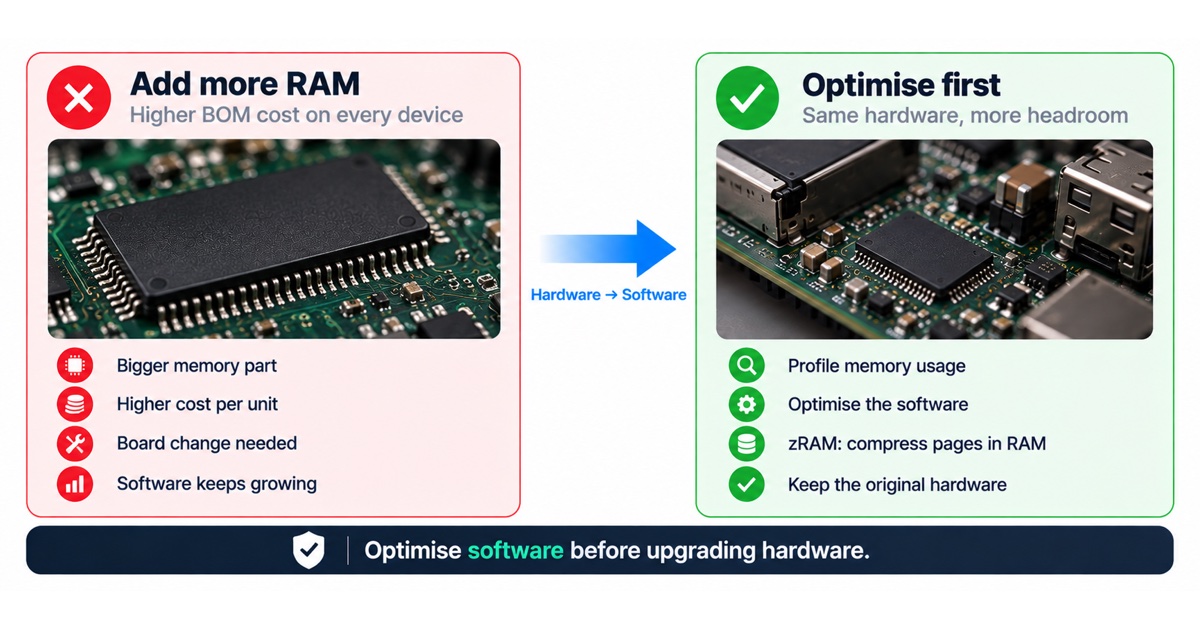
On a connected device, a memory upgrade is not only a part number. A different memory part can mean a board change, new layout and signal-integrity checks, a different supplier and price, and new qualification in production. On a product already in the field, two hardware variants also mean two configurations to build, test and support.
The cost repeats on every unit you ship. That is why it is worth knowing exactly where the memory goes before deciding.
What happened on LaMetric SKY
During the development of LaMetric SKY, software memory requirements eventually exceeded 128 MB. The obvious solution was to increase RAM. That would also have increased the BOM cost of every device shipped.
Instead, a different question was asked: can CPU cycles be traded for RAM?
- Memory usage was profiled.
- The software was optimised.
- zRAM was introduced. Instead of swapping less-used memory pages to flash, Linux compressed them in RAM.
CPU utilisation increased slightly, but the system gained enough effective memory headroom to keep the original hardware configuration.

Where memory usually goes on embedded Linux
- Application processes that load more libraries, caches or assets than they use.
- Several runtimes, for example separate interpreters or frameworks for different services.
- Buffers for graphics, video, networking or logging that are sized for the worst case and never released.
- File system caches and temporary files in RAM-based file systems.
- Memory leaks and fragmentation that only appear after days of uptime.
Options before buying more memory
| Option | What it does | Trade-off |
|---|---|---|
| Profiling and fixing the biggest users | Finds the processes and buffers that take most memory | Engineering time, no hardware change |
| Software optimisation | Smaller builds, fewer services, leaner libraries, smaller caches | Needs testing to keep features intact |
| zRAM | Compresses less-used memory pages in RAM instead of swapping to flash | Uses some CPU; avoids extra flash wear |
| Swap to flash | Moves memory pages to storage | Slow, and adds write wear on flash |
| More RAM | Adds physical headroom | Higher cost on every unit, board and supply changes |
The principle
Optimise software before upgrading hardware. More RAM is sometimes the right answer, but it shouldn’t be the first answer.

Checklist before adding RAM
- Measure memory use per process on the real device after long uptime, not only at boot.
- Separate what the system needs from what it caches.
- Look for leaks with long-running tests.
- Try zRAM and a leaner build, and measure the CPU cost.
- Plan for growth: how much headroom will future software releases need?
- Only then compare the cost of a memory upgrade across the expected volume.
How to profile memory on an embedded Linux device
Start with the whole system, then narrow down. Look at total memory use, the page cache and free memory over a long run, not only right after boot. Then break it down per process, separating memory a process really owns from memory shared with others, such as libraries. Repeat the measurement after days of uptime and under the heaviest real workload, because leaks and fragmentation only appear over time.
It also helps to look at memory by feature: which services exist only for one function, which caches could be smaller, and which buffers are sized for a worst case that never happens in the field.
Thinking about cost across the product’s life
A memory decision is made once but paid on every unit, for as long as the product ships. Compare the engineering effort of optimisation, which is paid once, with the extra cost per unit multiplied by the expected volume. Add the supply risk: memory parts change price and availability over a product’s life, and a design that depends on a larger or rarer part is more exposed. On the other side, leave enough headroom for the software releases you plan, so the product does not run out of memory two years after launch.
FAQ
Is zRAM safe for production devices?
zRAM is part of the Linux kernel and widely used. Like any change, it should be tested under real load, with the CPU cost measured.
When is more RAM the right answer?
When profiling shows the product genuinely needs the memory, optimisation would cost more than the hardware over the expected volume, or the roadmap needs headroom that software cannot provide.
Should we decide this before design freeze?
Yes. Memory decisions are cheapest before the board is frozen, and they also affect supply options, as we described in our article on the RAM shortage.
Does zRAM replace good memory hygiene?
No. It buys headroom, but leaks and oversized buffers still grow. Fix the biggest users first, then use zRAM for the remaining margin.
How do we avoid running out of memory after launch?
Track memory use in each release, test with long uptime and the heaviest real workload, and monitor memory on devices in the field. Set a budget per service so that new features have to fit within it, and treat a release that exceeds the budget like any other failed test. Field monitoring closes the loop: if memory on some devices grows over weeks, you see it before users do and can fix it with a software update.
What if the product really needs more memory later?
Then plan it as a hardware revision with a clear reason, a cost comparison and a migration plan for software and production. A decision made from measurements is easier to justify and to schedule than one made under pressure.
How we help
Our embedded Linux engineers profile memory and boot behaviour before anyone changes the BOM. See our embedded Linux development and BOM and manufacturing cost reduction services. If your product is about to move to a bigger memory part, talk to an engineer first.