Summary: Embedded Linux prototypes almost always boot from an SD card, and that is fine. Before mass production, many OEMs move to onboard eMMC, because production devices run 24/7 for years and reliability matters more than convenience. This article explains why, when SD is still the right answer, and what to check before you make the switch.
The pattern we see across OEMs
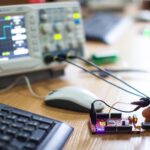
After many years of working on embedded Linux products, we see the same pattern repeat across OEMs. The first prototype boots from an SD card. It’s fast to flash, easy to replace and perfect for development.
The prototype becomes a demo. The demo becomes a pilot. Then someone asks: “Are we ready for mass production?” That’s usually when the discussion shifts to eMMC.
It is a small hardware decision, but it is one of the decisions that separates a development platform from a product. It also touches more of the system than it seems: the board layout, the boot chain, the update strategy, security and the production line.
What actually differs between SD and eMMC
Both are NAND flash with a built-in controller. The controller hides the raw flash behind a block device and handles wear levelling, error correction and bad-block management. The differences are in packaging, interface features and how predictable the part is over a product’s life.
- SD cards follow the SD Association specifications and sit in a socket. Consumer cards are built for cameras and phones, where writes are large and sequential and the card is easy to replace. Industrial-grade cards exist, with wider temperature ranges, more conservative flash configurations and longer availability.
- eMMC follows the JEDEC eMMC standard and is soldered to the board as a BGA package. Beyond the user area it offers dedicated boot partitions, an RPMB (Replay Protected Memory Block) partition for authenticated storage, configurable hardware partitions and standard registers that report the device’s wear and health.
| SD card | Onboard eMMC | |
|---|---|---|
| Mounting | Removable, in a socket | Soldered to the board |
| Vibration and shock | Contacts and socket are a weak point | No connector to loosen |
| Accidental removal or swapping | Possible, by users or installers | Not possible |
| Secure storage | No standard replay-protected area | RPMB for authenticated, replay-protected data |
| Boot partitions | Boot loader lives in the user area | Dedicated hardware boot partitions |
| Health reporting | Vendor-specific, if available | Standard wear and end-of-life indicators |
| Production | Cards flashed and inserted separately | Programmed on the line or pre-programmed |
| Field replacement and capacity changes | Easy | Requires a board change |

SD cards aren’t a bad choice
With industrial-grade media and software designed to minimise writes, SD cards can work well for pilots and low-volume deployments. But production is different. Devices are expected to run 24/7 for years, often in harsh environments. At that point, reliability matters more than convenience.
SD is still the right answer in some cases:
- Development kits and internal test fleets, where reflashing by swapping a card saves time.
- Pilots, as long as you use industrial-grade cards from a controlled supply and keep writes low.
- Products where removable storage is a feature, for example user-accessible data or media.
- Low volumes where a field technician is expected to replace storage as part of service.
If you stay on SD for a pilot, treat the card as a component, not a commodity. Specify the exact part, buy from a controlled channel and qualify it, because cards with the same label can behave very differently under small random writes and power loss.
Why production moves to eMMC
Onboard eMMC:
- Eliminates removable media.
- Improves robustness against vibration and accidental removal.
- Supports features like RPMB for secure storage.
- Simplifies manufacturing.
There is a second reason that matters as much as the hardware itself: predictability. A soldered, qualified eMMC part with a known configuration gives you the same storage behaviour on every unit you ship. That makes failures easier to reproduce, lifetime easier to estimate and support easier to plan.
Common failure modes to design for
Whichever medium you choose, most storage problems in the field come from the same few causes:
- Write wear. Logs, databases and frequent small writes wear flash faster than the capacity suggests. Estimate how much data the device writes per day and compare it with the endurance the vendor specifies.
- Power loss during writes. Devices that lose power while writing can corrupt the file system or the data being written. A read-only root file system and a journaling or log-structured file system for writable data reduce the risk.
- Corrupted updates. An update interrupted halfway can leave a device that does not boot. A/B partitions with automatic rollback keep a known-good system available.
- Temperature. Consumer media is not specified for the temperature range many connected devices see in enclosures, outdoors or in industrial settings.
- Supply changes. A storage part that changes silently between batches, or goes end-of-life, can change behaviour in production. Qualify a second source early.
A simple rule of thumb
- Prototype → SD card.
- Pilot → SD card or eMMC.
- Production → eMMC.
It’s a small hardware decision, but one that often marks the transition from a development platform to a production-ready product.

Checklist before you move to eMMC
- Estimate daily write volume and the required lifetime, then choose capacity and configuration with margin.
- Decide what goes into the boot partitions, the user area and RPMB.
- Make the root file system read-only and keep logs and temporary data in RAM where you can.
- Use an A/B or recovery-based update scheme so an interrupted update cannot brick a device.
- Plan how the eMMC is programmed in production: on the line or pre-programmed by the supplier.
- Read the wear and health registers in your fleet telemetry, so you see ageing before it becomes a failure.
- Qualify at least one alternative part and check its lifecycle status.
What to test before production
- Repeated power cuts during writes and during updates, followed by a boot and data check.
- Long-running write tests that match your real workload, not only a sequential benchmark.
- Operation at the temperature extremes in your specification.
- Boot time and update time with the production storage configuration.
- The production programming step itself: time per unit, verification and what happens when it fails.
FAQ
Can we keep SD cards for the pilot?
Yes, if the pilot uses industrial-grade cards from a controlled supply, the software keeps writes low and you plan the move to eMMC before mass production.
Is eMMC automatically reliable?
No. eMMC removes the socket and adds useful features, but write-heavy software, missing power-loss handling or an undersized part can still wear it out early. The software design matters as much as the medium.
How much capacity do we need?
Size for the full system, two copies of it if you use A/B updates, your data and logs, plus margin. Extra capacity also gives the controller more room for wear levelling.
Can devices already in the field move from SD to eMMC?
Not without new hardware. Moving to eMMC means a board revision, so plan it before the production design is frozen.
How we help
We take embedded Linux products from the first SD-card prototype to production hardware and manufacturing: embedded Linux and storage layout, electronics and PCB design, secure OTA updates with rollback, and NPI and production ramp-up with your manufacturer. If you are preparing for mass production, talk to an engineer.