Summary: QR codes and AprilTags look alike, but they are built for different jobs. QR codes carry information. AprilTags are fiducial markers for position, orientation and pose estimation. Choosing the right one can remove a lot of unnecessary complexity, and not every camera problem needs a neural network.
A geometry problem, not an AI problem
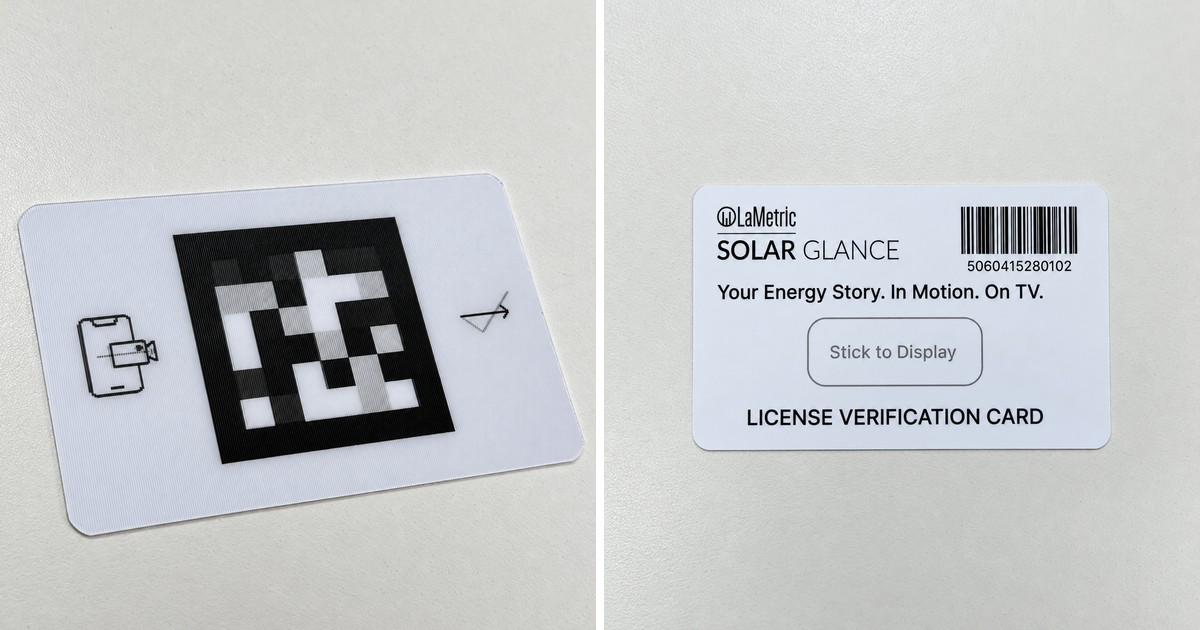
We learned this while building LaMetric Solar Glance. During setup, we needed to measure the physical size and position of a TV using a smartphone camera.
This wasn’t an AI problem. It was a geometry problem. So we used AprilTags. Because their dimensions are known, the camera can detect their corners and use them as reference points for real-world measurements. Simple, deterministic, and no AI required.
Why it came up again
Recently we saw an edge AI system using QR codes for visual positioning, and it reminded us of that decision. Why QR codes instead of AprilTags? The two markers are designed for different things:
- QR codes → information. Great for IDs, URLs, serial numbers and configuration.
- AprilTags → machine vision. Designed as fiducial markers for position, orientation and pose estimation. That’s why they are widely used in robotics, drone landing, industrial vision and camera calibration.
How each marker works
A QR code is a two-dimensional barcode. Its job is to store data: it encodes text such as a URL or an ID, with error correction so it can still be read when part of it is damaged. The finder patterns in three corners help a reader locate and orient the code, but the design priority is how much information it can hold and how reliably it decodes.
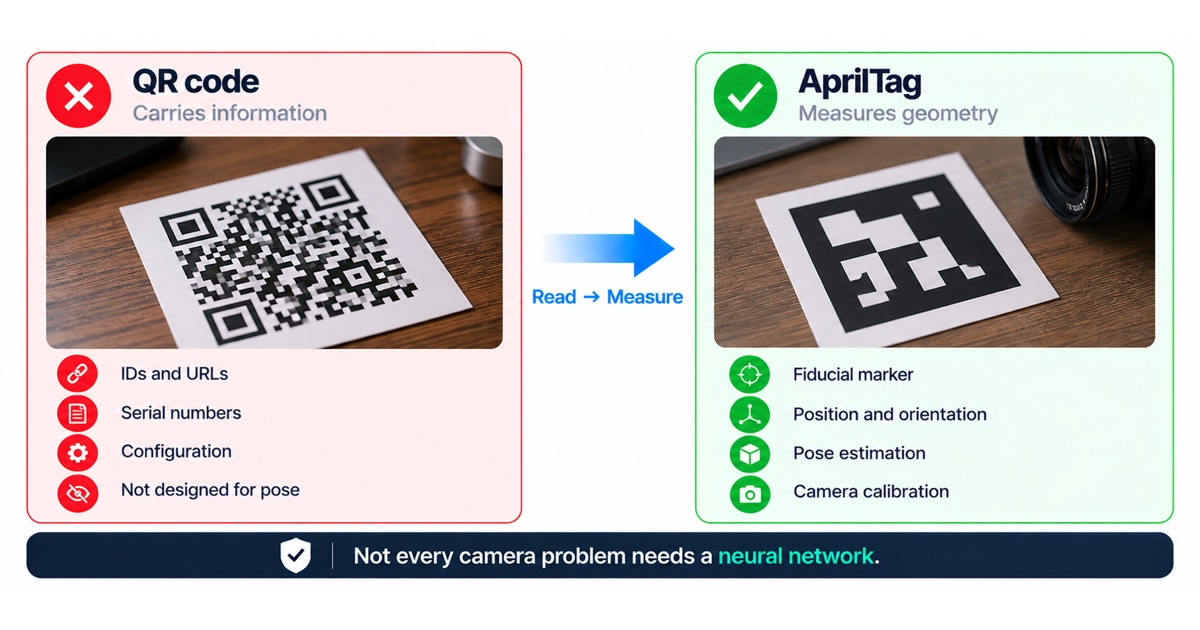
An AprilTag is a fiducial marker from the AprilTag family developed for robotics research. It carries only a small ID. Its job is to be found quickly and reliably in an image, and to give precise corner positions. With the camera calibrated and the tag size known, those four corners are enough to compute where the tag is in 3D space and how it is oriented relative to the camera.
That is why the two are not interchangeable. A QR code can be detected and its corners used for rough positioning, but it was not designed for that. An AprilTag cannot store a URL, but it gives you geometry you can rely on.
| QR code | AprilTag | |
|---|---|---|
| Main purpose | Carry information | Measure geometry |
| Payload | Text, URLs, IDs, configuration | A small numeric ID |
| Pose estimation | Possible but not what it is designed for | Designed for it, with a calibrated camera and known size |
| Detection at distance and angle | Needs enough resolution to decode the data | Simpler pattern, built to be detected robustly |
| Typical uses | Product labels, onboarding links, serial numbers | Robotics, drone landing, industrial vision, camera calibration |

When to use which
- Use a QR code when a person or device needs to read data: an onboarding link, a serial number, a Wi-Fi configuration or a product ID.
- Use an AprilTag when the camera needs to know where something is: its position, distance, size or orientation.
- Use both when you need data and geometry, for example a QR code for the ID and AprilTags in the corners for position.
Common mistakes
- Using a neural network for a problem that geometry already solves, which adds training data, compute and uncertainty.
- Skipping camera calibration, so the pose estimate is wrong even when detection works.
- Printing markers without controlling their size, which breaks any measurement that relies on a known dimension.
- Ignoring lighting, glare and print quality, which cause most detection failures in the field.
Checklist for marker-based measurement
- Decide whether the problem is information or geometry.
- Calibrate the camera you actually ship, not only a development camera.
- Fix and verify the printed marker size.
- Test at the real distances, angles and lighting conditions.
- Define what happens when no marker is found, so the user gets clear guidance.
The broader edge AI lesson
Choosing the right primitive can eliminate a lot of unnecessary complexity. Not every camera problem needs a neural network, and not every black-and-white marker should be a QR code.
Designing a marker-based setup flow
Markers work best when the whole flow is designed around them, not only the detection code. In a setup flow that uses a phone camera, think about what the user sees and does:
- Show the marker on a screen or a printed card, at a size that stays detectable at the expected distance.
- Guide the user to hold the phone so the whole marker is in view, with live feedback when detection succeeds.
- Collect several detections and combine them, rather than trusting a single frame.
- Check the result against plausible limits, for example a screen size within the supported range.
- Give a clear fallback, such as manual entry, when detection fails.
Deterministic methods like this are also easier to test. You can define the expected result for each case and check it automatically, which is much harder with a trained model whose behaviour depends on its training data.
When to combine geometry and AI
Geometry and AI are not opposites. Many products use a fiducial marker to get a precise reference frame, then use a model for the part of the problem that really needs learning, such as recognising what is inside the measured area. The skill is in using each tool only where it is the simplest reliable option.
FAQ
Can a QR code be used for positioning?
Roughly, yes, because its corners can be detected. For reliable position and pose, a marker designed as a fiducial is the better tool.
Do AprilTags need a calibrated camera?
To measure real-world position and orientation, yes. Detection works without calibration, but accurate pose estimation needs the camera’s intrinsic parameters and the tag size.
When does AI make sense instead?
When there is no marker you control in the scene, for example recognising objects or people. When you can place a marker, geometry is usually simpler and more predictable.
Which AprilTag family should we use?
Families differ in how many unique IDs they offer and how robust they are against false detections. For most products a widely used family with good library support is the safe choice. Test detection range and false positives with your camera and printing method before deciding.
How do we test marker detection?
Build a test set of real images: different distances, angles, lighting, glare and partly covered markers. Because the expected result is known, each case can be checked automatically on every software change. Include images from the cheapest phones or cameras your users are likely to have, not only from the development device.
Keep a small set of images where detection is expected to fail, for example a marker that is too far away or mostly covered. These show whether the system fails safely and gives the user a useful message, which matters as much as the success cases.
How we help
We build computer vision into connected products, from deterministic marker detection to on-device inference. See our edge AI and computer vision service and the Industrial Vision Box accelerator, which speeds up vision products with a ready camera, inference and connectivity foundation. If you are working out the simplest vision approach for your device, talk to an engineer.