Summary: MIPI CSI-2 or USB is one of the most common questions in edge AI projects. If you are building a product, choose MIPI. If you are validating an idea, choose USB. Problems start when a team assumes the prototype camera will become the production camera.
Two interfaces, two jobs
We get this question surprisingly often, and the answer is usually simple. The right camera interface depends on whether you are validating an idea or building the product.
What MIPI CSI-2 gives you:
- Lower latency.
- Lower power consumption.
- Direct control of the image sensor.
What USB gives you:
- Faster development.
- Plug-and-play integration.
- A huge ecosystem of cameras.
How the two interfaces work
A USB camera is a complete device. It has its own sensor, its own image processor and usually its own compression, and it presents itself to the host through the USB Video Class (UVC) standard. On Linux it appears as a video device and works with standard drivers. That is exactly why it is so convenient for a prototype: plug it in and start collecting frames.
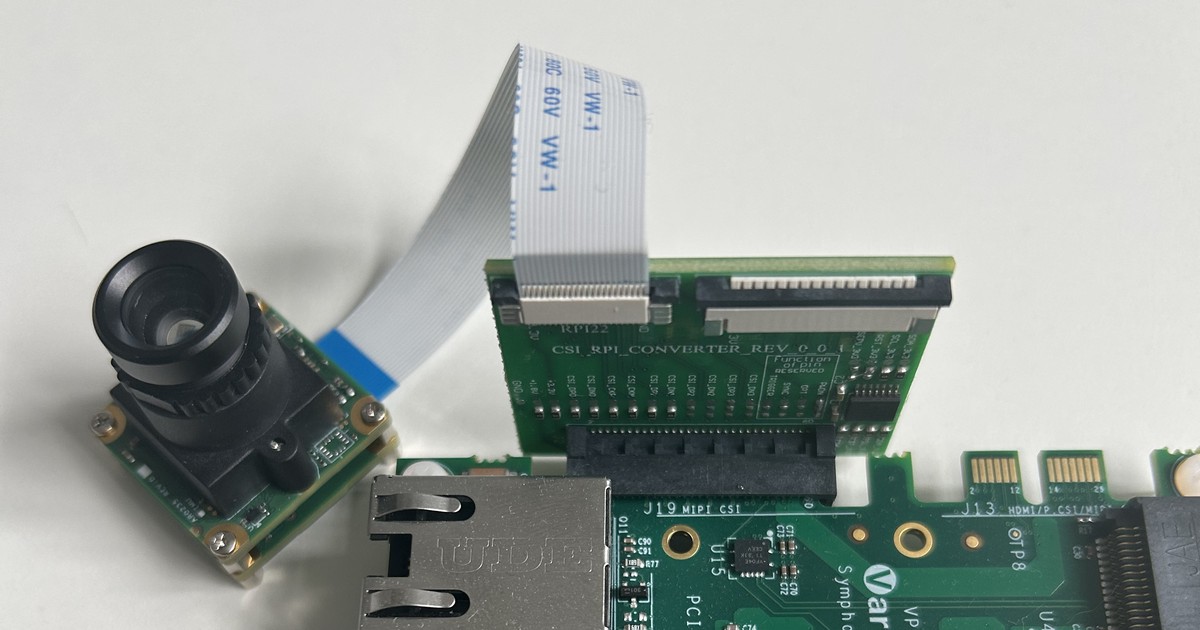
A MIPI CSI-2 camera is a sensor module connected directly to the camera interface of the SoC, usually through a flat flex cable. The raw image data goes into the SoC’s own image signal processor (ISP), which handles demosaicing, exposure, white balance and noise reduction. The application processor controls the sensor directly, typically over I2C, so exposure, gain, frame timing and triggering are under your control.
That difference explains the trade-offs. USB moves the image processing into the camera and gives you a standard interface. MIPI moves it into your SoC and gives you control, efficiency and a tighter integration with the rest of the vision pipeline.
| USB camera | MIPI CSI-2 camera | |
|---|---|---|
| Best for | Validating an idea | Shipping the product |
| Integration effort | Low, standard UVC driver | Higher, sensor driver, device tree and ISP tuning |
| Latency | Higher, extra processing and transport | Lower, direct path into the SoC |
| Power | Higher, the camera has its own processing | Lower, the SoC’s ISP does the work |
| Sensor control | Limited to what the camera exposes | Direct control of exposure, gain and timing |
| Mechanical design | Cable and connector, flexible placement | Short flex cable, placement close to the SoC |
| Choice of cameras | Huge ecosystem off the shelf | Depends on modules and drivers for your SoC |
Where teams get into trouble
The common mistake is assuming the prototype camera will become the production camera. Changing from USB to MIPI isn’t just swapping an interface. It often means:
- Sourcing a different camera module.
- Redesigning the hardware.
- Integrating new drivers.
- Tuning the ISP.
- Revalidating the vision pipeline.

Why the switch is bigger than it looks
A vision model is trained and validated on images from a specific camera. When the camera changes, the images change: colour response, noise, sharpness, dynamic range and the way the ISP processes them. A model that worked well on the USB camera’s output can lose accuracy on the new sensor, even when the scene is the same.
The hardware changes as well. A MIPI camera needs a connector on the board, a flex cable that fits the enclosure, a lens and mounting that suit the optics, and a sensor that your SoC supports with a working driver. Each of these is a design decision with its own lead time and test effort.
When USB is the right answer for the product
USB is not only for prototypes. It can be the right production choice when:
- The camera is an accessory the customer connects or replaces.
- The camera has to sit far from the main board, beyond what a MIPI flex cable allows.
- Volumes are low and an off-the-shelf camera with long availability is the safer supply choice.
- The image quality and latency of the USB camera already meet the product requirements, measured on the real device.
Checklist before you choose
- Is this the prototype or the product?
- Which sensors does your SoC support with mature drivers and ISP tuning?
- What latency, frame rate and power budget does the product need?
- Where does the camera sit in the enclosure, and how long is the cable?
- Will the training data come from the same camera that ships?
- Who supplies the module, and for how long?
What to test on the real hardware
- End-to-end latency from exposure to result, not only inference time.
- Image quality in the real lighting conditions, including low light and backlight.
- Model accuracy on images from the production camera.
- Power consumption and temperature with the camera streaming continuously.
- Stability over long runs: dropped frames, driver errors and recovery after a camera reset.
The one question to ask early
That’s why we always ask one question at the start of a vision project: is this the prototype, or is this the product? The answer usually decides the right camera interface, and asking it early saves a hardware redesign later.
Cost and lead-time considerations
The camera choice affects the bill of materials and the schedule in ways that are easy to miss early. A USB camera is a finished product with its own housing, electronics and cable, and you pay for all of it on every unit. A MIPI module is usually cheaper per unit at volume, but it shifts work into your project: the board needs a camera connector, the enclosure needs a lens opening and mounting, and the software needs a driver and ISP tuning for that specific sensor.
Lead times matter as well. Camera modules for embedded SoCs are often built around a specific sensor, and the sensor’s availability and lifecycle decide how long you can buy the module. Ask for lifecycle information early and identify an alternative sensor that your SoC also supports.
A simple decision path
- If you are still validating the idea, start with USB and collect early data.
- As soon as the product direction is clear, pick the production sensor and SoC together.
- Move data collection to the production camera, so the model is trained on the images it will see in the field.
- Freeze the camera interface before the board layout is frozen, not after.
FAQ
Can we prototype with USB and still ship MIPI?
Yes, as long as you plan for it. Choose the production sensor early, collect training data with it as soon as possible and budget time for the driver, ISP tuning and revalidation.
Is MIPI always faster?
The interface itself adds less overhead, but the result depends on the whole pipeline. Measure latency end to end on your hardware.
Do we need ISP tuning?
For a MIPI sensor, usually yes. The ISP settings decide how the image looks to your model, so tuning is part of getting the accuracy you validated.
What changes for the software team?
With USB, the application usually reads frames through a generic video interface. With MIPI, the team also owns the sensor driver, the device tree configuration, the ISP settings and the media pipeline that connects them. Plan for that work explicitly, and keep the application code independent of the camera interface where possible, so switching from the prototype camera does not mean rewriting the application.
How we help
Our engineers integrate camera drivers, ISP and image pipelines on embedded hardware, from the first prototype to production devices. See our edge AI and computer vision and BSP and Linux driver services, or start from the Industrial Vision Box accelerator so your team builds the vision application, not the platform. If you are choosing a camera interface for an edge AI product, talk to an engineer.